
Best Anki App for iPhone & iPad (2026): Every Option Compared
.apkg decks. In 2026 that third group is crowded — Guru, Noji, AlgoApp, MintDeck and Mochi all accept Anki files, but they differ on whether scheduling survives the import, which scheduler runs your reviews, what is free, and whether decks export back out. AnkiDroid is Android-only. This guide compares all seven options, then covers moving your decks over in four steps.
Is Anki free on iPhone?
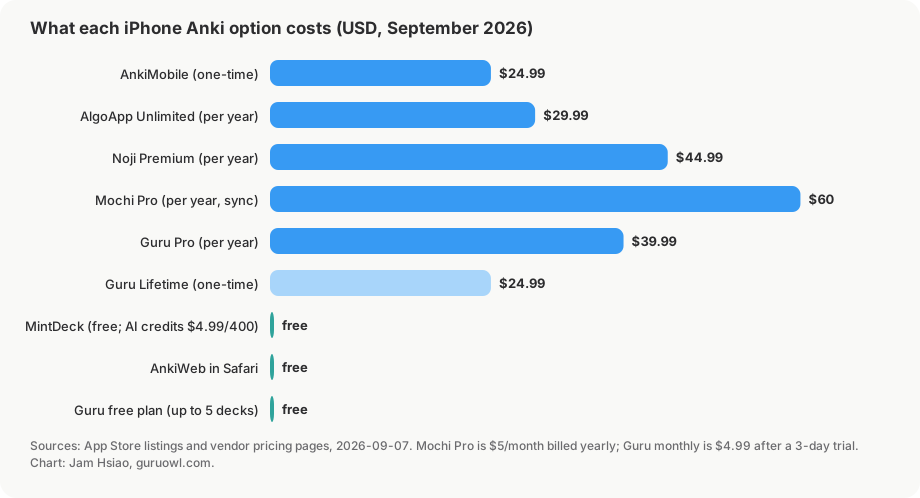
Short answer: partly. The Anki project is free and open-source on desktop, and AnkiWeb (the browser version) is free. But the official native iOS app, AnkiMobile, is a paid app — $24.99, a one-time purchase. That price is intentional: it funds development of the whole free Anki ecosystem. So "is Anki free on iPhone" usually means "is there a free way to review my decks on my phone," and the honest answer is yes (AnkiWeb), but the good native experiences cost money. The newer Anki-compatible apps mostly import and review for free and charge for sync, editing, or AI.
For every free option and what its free plan leaves out (daily caps, offline, review history), see Is Anki free on iPhone and iPad?
Here are the three main paths, with the trade-offs that actually matter; the four other Anki-compatible apps follow.
Option 1: AnkiMobile (the official app)
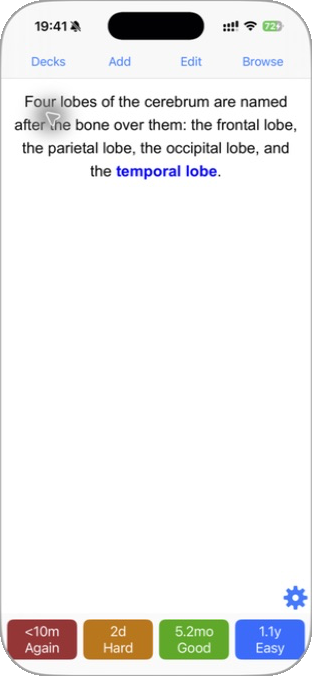
AnkiMobile is built by the same author as desktop Anki, so it's the most faithful to "real" Anki — same scheduler, same note types, same sync to AnkiWeb. Its App Store listing says it runs "the same SM2 and FSRS scheduling algorithms that the computer version of Anki uses," and media is stored on the device so you can review offline. If you want the canonical behavior and don't mind the classic Anki interface, this is the safe choice.
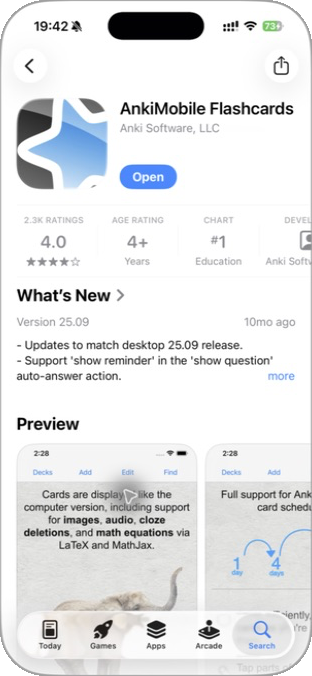
- Cost: $24.99 one-time. Requires iOS 15.2 or later.
- Best for: purists who already live in the Anki ecosystem and sync across desktop + phone. It is also the only iPhone app that renders desktop Anki's card templates exactly, because it is Anki.
- Watch out for: the UI is powerful but dated, and it only accepts game controllers that expose Apple's
GCExtendedGamepadprofile — which the popular cheap 8BitDo models don't (more on that below).
Option 2: AnkiWeb in the browser
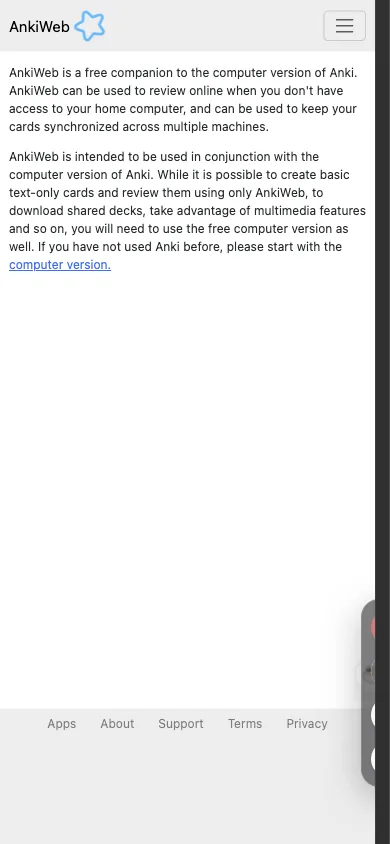
AnkiWeb is the free web client. Log in at ankiweb.net on Safari and you can review due cards from any device, no install. The same free account is the sync backbone for desktop Anki, AnkiMobile and AnkiDroid.
- Cost: free. Per the Anki manual, accounts that haven't synced in 6 months may have server-side data deleted (local copies are unaffected; you get an email first).
- Best for: occasional review, or trying Anki before paying for a native app.
- Watch out for: it's a website, not an app — no offline review, limited gestures, no media-heavy editing, and it leans on you having a desktop for the heavy lifting.
Option 3: A native alternative built for iPhone (Guru)
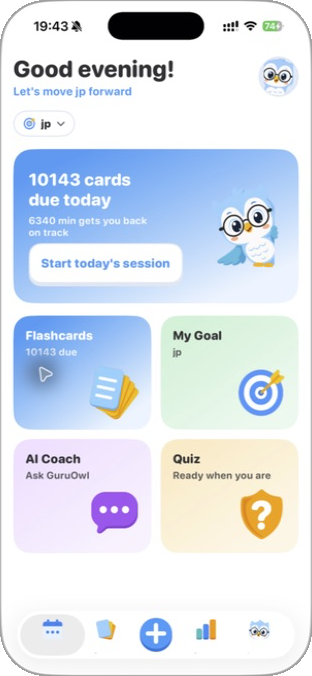
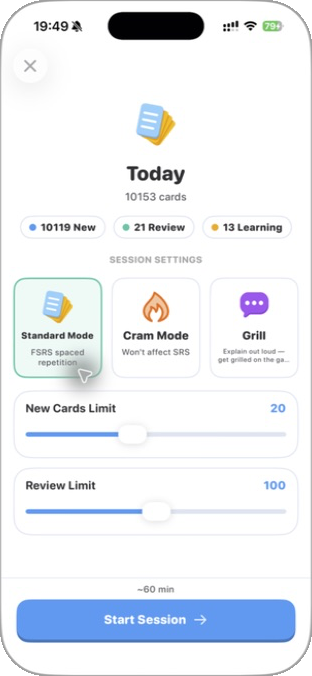
Guru is a third path: a native iOS app that runs the Anki workflow but rebuilt for a phone. It imports .apkg and .colpkg files using Anki's own engine, so cards, cloze, images, audio, sub-decks and FSRS scheduling state are preserved — then reviews them with FSRS (Again / Hard / Good / Easy, one card per note per day).
Measured on 2026-09-07 with real shared decks: Zanki (16,966 cards, 125 MB) in about 15 seconds; USMLE Step 2 (5,647 cards); MileDown MCAT (2,888 cards, 238 MB); and the JLPT eggrolls deck (10,147 cards plus 10,107 audio files) in 89 seconds. Files open from Files, AirDrop, Safari downloads, or any share sheet.
- Cost: importing and daily review are free. The free tier covers up to 5 decks (imported and created combined) and 2 goals. Pro adds card editing, cross-device sync with GuruOwl web, Study Lock, and unlimited decks — US$4.99/month after a 3-day trial, US$39.99/year, or a one-time Lifetime at US$24.99 that includes 5,000 AI credits. Requires iOS 17 or later.
- Best for: people who want a fast, modern iPhone-first app, AI help turning notes and PDFs into cards, Cram Mode before exams, and a built-in free wireless Anki Remote.
- Watch out for: it's a separate app, not a skin over AnkiMobile — so you import your decks into it (see how to import your Anki decks) rather than syncing through AnkiWeb. Decks export back to
.apkg. Guru is not affiliated with Anki.
The other Anki-compatible iPhone apps
Four more App Store apps accept Anki files. Prices are from each app's US App Store listing or official pricing page, September 2026.
Noji (formerly AnkiPro)
Noji is a free-to-download flashcard app from DELIGHTHUB PTE. LTD. with a Premium subscription: US$4.99/month, US$89.99/year, or US$74.99 lifetime, on iOS 15.4 or later. Its help center says it supports .apkg and .colpkg files and can "migrate your progress along with the flashcards" if you include progress data in the Anki export — but the documented import path is drag-and-drop on the noji.io website, not the phone. Noji's own comparison page says it schedules with SM-2 (the classic Anki algorithm) behind presets such as "Study medical material," works offline, and syncs across devices via its web version. Export back to Anki: not stated.
AlgoApp (formerly AnkiApp)
AlgoApp is a free download with an "Unlimited" subscription at US$9.99/month, US$29.99/year, or US$149.99 lifetime, on iOS 15.0 or later. Its App Store listing says it "natively supports FSRS," works offline, and "syncs automatically with desktop, web app, and your other phones and tablets." The important caveat is in its own support docs: "Card content imports, but Anki review history and scheduling data do not." A mature deck restarts with every card as new. Export back to Anki: not stated.
MintDeck
MintDeck is a newer, free, offline-first app (developer Sergiu Puscas) that requires iOS 18.0 or later. The listing promises "full Anki .apkg import with scheduling and media support," FSRS scheduling, and iCloud (CloudKit) sync between iPhone and iPad. Its import guide says cards, cloze and image-occlusion cards, media, tags and study progress ("intervals and due dates, so FSRS continues your schedule") all carry over, and that importing is free. The only in-app purchases are AI credits (US$2.99 and US$4.99 packs). No Android or web client is listed; sync is Apple-only. Export back to Anki: not stated.
Mochi
Mochi is a Markdown notes-plus-flashcards app (developer Matthew Steedman) on Mac, Windows, Linux, iOS 15.6+ and Android. The free plan is "$0 forever" with unlimited offline use, unlimited cards and decks, and import/export; Pro is US$5/month billed annually and is what unlocks sync across devices, published decks, and AI features. Mochi's docs say it "can import Anki .apkg files, including review history," but it "strips CSS and JavaScript and converts HTML to Markdown," so heavily styled decks (AnKing templates, image occlusion) will not look the same. Mochi schedules with its own algorithm by default; FSRS is a switch in Settings → Review Settings. Export is to .mochi, Markdown, or CSV — the CSV is "designed primarily for compatibility with Anki" — not .apkg.
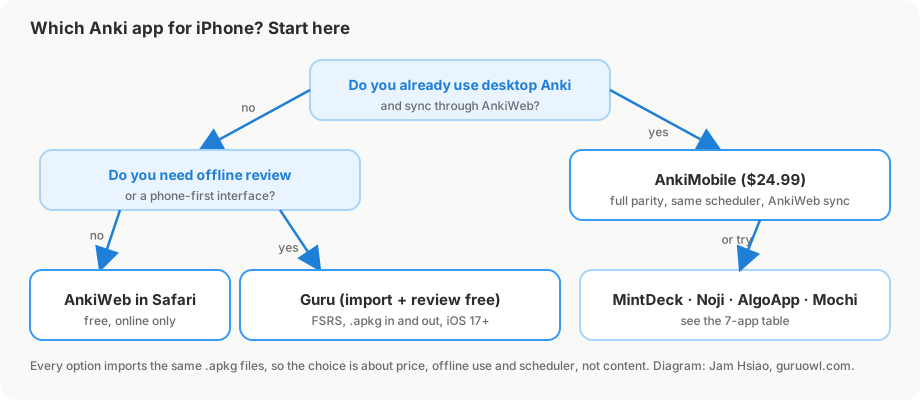
Anki iOS app comparison: all 7 options
| App | Price | Imports Anki .apkg | Scheduler | Offline | Sync | Best for |
|---|---|---|---|---|---|---|
| AnkiMobile | $24.99 one-time | Yes (it is Anki; scheduling kept) | SM-2 or FSRS | Yes | AnkiWeb (free) ↔ desktop, AnkiDroid | Exact desktop parity, add-on templates |
| AnkiWeb | Free | Via desktop Anki | SM-2 or FSRS | No | Is the sync server | Trying Anki, occasional review |
| Guru | Free import + review; Pro $4.99/mo, $39.99/yr, $24.99 lifetime | Yes, via Anki's engine (cards, cloze, media, sub-decks, FSRS state kept) | FSRS | Yes | Pro: with GuruOwl web | Big shared decks on iPhone, AI cards, free wireless remote |
| Noji | Free; Premium $4.99/mo, $89.99/yr, $74.99 lifetime | Yes, with progress (via noji.io web import) | SM-2 | Yes | Own web app + iOS | Simple UI, pre-made deck library |
| AlgoApp | Free; Unlimited $9.99/mo, $29.99/yr, $149.99 lifetime | Cards only — review history and scheduling not imported | FSRS | Yes | Desktop, web, other devices | Language decks, starting fresh |
| MintDeck | Free (AI credits $2.99 / $4.99) | Yes, with scheduling and media | FSRS | Yes (offline-first) | iCloud iPhone ↔ iPad only | Free FSRS review on iOS 18+ |
| Mochi | Free; Pro $5/mo billed annually | Yes, with review history; CSS/JS stripped, HTML → Markdown | Own algorithm; FSRS optional | Yes | Pro only | Notes-first learners, cross-platform |
How to read it: if your deck's value is in its scheduling history and templates (AnKing, Zanki), the rows that keep both are AnkiMobile and the apps that import with scheduling preserved — Guru, and by its own description MintDeck. Starting fresh with a language deck, AlgoApp's content-only import matters less. For notes and cards in one Markdown workspace, Mochi is the one built for that.
Quick comparison
| AnkiMobile | AnkiWeb (browser) | Guru | |
|---|---|---|---|
| Cost | $24.99 one-time | Free | Free import + review, then from $4.99/mo or $24.99 lifetime |
| Native iOS app | Yes | No (website) | Yes |
| Offline review | Yes | No | Yes |
Imports .apkg / .colpkg |
Yes | Via desktop | Yes (intact) |
| Scheduler | Anki / FSRS | Anki / FSRS | FSRS |
| AI card generation | No | No | Yes |
| Free wireless remote for desktop Anki | No | No | Yes |
| Cheap 8BitDo controllers | No (small models) | n/a | Yes (via the phone) |
Anki on iPad: same decks, more room
Everything above works on iPad too — AnkiMobile and Guru are universal apps (one purchase covers iPhone and iPad), and AnkiWeb runs in Safari. iPadOS is still iOS underneath, so the options are identical; the iPad just gives the workflow more room to breathe:
- A bigger canvas for image-heavy decks. Anatomy atlases, pathology slides, and image-occlusion cards are far easier to read on an 11–13″ screen than on a phone.
- Split View and Stage Manager. Keep a lecture PDF or your notes open beside your reviews and make cards without app-switching.
- Apple Pencil. Annotate a card, sketch a recall diagram, or mark up an image-occlusion card by hand.
- Hardware-keyboard shortcuts. With a Magic Keyboard or Folio,
1/2/3/4grade cards andSpaceflips them — the same keys a wireless Anki Remote sends.
The answer to "best Anki app for iPad" is the same as for iPhone: AnkiMobile for exact desktop parity, or a native alternative like Guru for a faster, touch-first experience with AI cards and FSRS. For a complete look at iPad setups, see our Anki on iPad guide.
Do you even need Anki on the phone — or a remote for the desktop?
A lot of people searching "anki on iphone" actually review on desktop Anki and just want to drive it from the couch without reaching for the keyboard. If that's you, you don't need to move your workflow to the phone — you can turn the iPhone into a wireless remote for Anki Desktop. See the free Anki Remote setup and the full comparison of remote options.
How to move your Anki decks to iPhone
Whichever native app you choose, the first step is getting your .apkg files onto the phone with scheduling intact. These four steps work for Guru, MintDeck, Mochi and (through the web) Noji; AnkiMobile normally syncs through AnkiWeb instead, but also opens .apkg files directly.
- Export from desktop Anki with scheduling and media. In Anki Desktop, right-click the deck → Export, choose Anki Deck Package (.apkg), and tick Include scheduling information and Include media. Without the first box every card arrives as new; without the second, images and audio are missing. For a whole collection, use File → Export → Anki Collection Package (.colpkg). If the file fails to open in another app, re-export with Support older Anki versions checked.
- Get the file onto the iPhone. AirDrop is the fastest: right-click the file on the Mac → Share → AirDrop → your phone. On Windows, drop it in iCloud Drive, Google Drive, or Dropbox and open the Files app on the phone. Email only works for small decks without media.
- Open it in the app. In Files, tap the
.apkgand pick the app from the share sheet (Guru registers as an opener for.apkgand.colpkg, so the file opens directly from Files, AirDrop, or a Safari download). Big files take a minute — Guru measured about 15 s for a 125 MB Zanki export and 89 s for a 10,000-card audio deck — so keep the app in the foreground until the import reports done. - Verify the counts. Before deleting anything on the desktop, compare total cards, due-today, and the number of sub-decks against Anki Desktop's deck overview. If totals match but every card is due today, the export lacked scheduling information — go back to step 1. Missing images mean the export skipped media.
Moving your existing decks over
The four steps above are the short version. The full walkthrough with screenshots is here: How to import your Anki decks (.apkg) onto iPhone; to peek inside a single deck, see how to open .apkg files on iPhone. The important part — your progress is never trapped; everything exports back to a standard .apkg.
FAQ
Is Anki free on iPhone?
Not the official app. AnkiMobile is US$24.99, one-time, with no subscription. AnkiWeb in Safari is free but has no offline mode. Among the Anki-compatible alternatives, Guru, MintDeck and Mochi let you import .apkg decks and review them for free; Noji and AlgoApp are free to download with paid tiers for extra features.
Does AnkiMobile sync with AnkiDroid? Yes. Both sync through the same free AnkiWeb account, together with desktop Anki. Reviews you do on an Android phone show up on the iPhone after the next sync, and vice versa. Sync before switching devices to avoid a "full sync required" prompt.
Can I use AnKing on iPhone without AnkiMobile?
Yes, as long as the app imports the .apkg with scheduling and media. Guru imports AnKing-scale decks via Anki's engine (Zanki, 16,966 cards, about 15 seconds) with cloze, images and FSRS state intact. MintDeck states the same for scheduling and media. Mochi imports the cards and review history but strips AnKing's CSS and JavaScript, so the cards render differently. AlgoApp imports the cards only, with no scheduling. AnkiMobile is still the only option that runs AnKing's templates exactly as the desktop add-ons render them.
Does Anki work offline on iPhone? AnkiMobile: yes, media is stored on the device. AnkiWeb: no, it is a website. Guru, Noji, AlgoApp, MintDeck and Mochi all review offline; sync happens when you reconnect. On Mochi, sync itself is a Pro feature, but offline review is free.
Which Anki iPhone app uses FSRS? AnkiMobile (SM-2 or FSRS, matching desktop), Guru (FSRS only), AlgoApp (FSRS), MintDeck (FSRS), and Mochi (own algorithm by default, FSRS as an option in Review Settings). Noji describes its scheduler as SM-2.
Can I export my decks back out?
AnkiMobile and desktop Anki export standard .apkg files. Guru exports to .apkg. Mochi exports .mochi, Markdown, or CSV (the CSV is intended for Anki), not .apkg. Noji, AlgoApp and MintDeck do not state an Anki export on their public pages — confirm before moving a collection you can't rebuild.
Can I use Anki on iPad too? Yes. AnkiMobile and Guru are both universal (iPhone + iPad). AnkiWeb works in any iPad browser.
Is AnkiDroid available on iPhone? No. AnkiDroid is Android-only. On iOS your native options are AnkiMobile or an alternative like Guru.
Will my desktop streak and scheduling carry over?
Yes, if you import a full .apkg/.colpkg — the scheduling state travels with the cards. See the import guide.
Which is best for medical school decks (AnKing, etc.)? For a phone-first experience with hands-free review and FSRS, a native alternative is usually the most comfortable; for exact parity with desktop add-ons, AnkiMobile.
Want Anki that feels at home on iPhone?
Import your decks in seconds, review with FSRS, and use the free wireless remote. Importing and daily review are free for up to 5 decks.
Get Guru