Anki import, export, and native sync
Compare GuruOwl's browser viewer, web deck import, iPhone import and Anki export. Separate content transfer, media, review history and cloud sync; download the verified samples.
Choose the Anki workflow you need: looking inside a package, importing it for study, exporting card content, or syncing a collection. These paths have different limits; successful import is not proof of a complete backup or cloud sync.
The short version
- File formats:
.apkgand.colpkgin,.apkgout. - On iPhone and iPad (the Guru app, iOS 17+): imports run through Anki's own engine, so cards, cloze deletions, images, audio, sub-decks and FSRS scheduling state come through. Open a deck from Files, AirDrop, a Safari download or the share sheet. Importing and daily review are free for up to 5 decks.
- On the web (this site): upload a package in Materials, up to 256 MB, a 64 MB decompressed database and 10,000 notes. Cards and cloze content are converted into GuruOwl notes. Packaged images/audio are not imported; scheduling is converted, not copied losslessly.
- Measured on real shared decks (2026-09-07, iPhone): Zanki Physiology & Pathology 16,966 cards / 125 MB in about 15 seconds; USMLE Step 2 5,647 cards / 68 MB in about 10 seconds; MileDown MCAT 2,888 cards / 238 MB in about 5 seconds; JLPT "eggrolls" N1–N5 10,147 cards with 10,107 audio files / 121 MB in 89 seconds; First Aid 2017 Pharmacology 1,232 cards.
- Free limits on iPhone: the free plan covers up to 5 top-level decks, imported or created; a whole
::tree counts as one. Check the installed app's limits and purchase screen for the features you need; free import/review does not mean every cloud or AI feature is free. - Not affiliated with Anki, AnkiMobile or AnkiWeb.
Bringing existing Anki decks in
Three ways in, depending on where you live:
- On iPhone — the Guru iOS app opens
.apkgand.colpkgfiles directly. Export from desktop Anki with File → Export → Anki Deck Package, tick Include scheduling information and Include media, then AirDrop the file or save it to Files and tap it. Sub-decks keep their tree, cloze notes produce one card per cloze number, and the review schedule picks up where it left off. Import and cloud sync are separate. Check the deck's actual sync status in your installed app and confirm it on the other device; signing in or having Pro is not proof that an import has finished uploading. Keep the original package and a separate backup. - Upload the package here — use Materials. Limits: 256 MB package, 64 MB database, 10,000 notes. Export from Anki with scheduling information included. New web imports retain original review logs and scheduling snapshots; packaged media is still skipped. Suspended and buried cards stay out of the web review queue.
- From desktop Anki — use native sync below: point Anki at GuruOwl and hit Sync, and your whole collection (including media) lands in your account. The right path for very large collections.
Want to look inside a package before importing it? The free .apkg viewer opens it in your browser without uploading anything.
What happens during review
Web import skips notes with an empty first field and history, or cards whose history snapshot exceeds 1.5 MB, and returns their count as skippedHistory; the rest of the deck imports normally, so keep the original package for those skipped items.
Imported web decks review with FSRS using Again, Hard, Good and Easy, starting from the imported scheduling baseline. Original Anki logs are stored separately rather than replayed as new ratings. Available FSRS stability/difficulty are retained; older SM-2 cards require approximate FSRS initialization for web study. Undoing a web review does not erase the original history.
The iPhone import uses a different engine and data path. Check a few basic, cloze and media cards after importing; test downloaded media while offline before relying on it. Browser-viewer results do not certify iPhone rendering, offline playback or cross-device sync.
Export cards and review history
The web deck page exports a standard .apkg with supported card content, the original imported review logs, effective GuruOwl ratings and the current schedule. Old GuruOwl-only events did not record per-review intervals or answer duration: those unknown fields are zero in Anki, not fabricated. An additional JSON file preserves exact source snapshots and GuruOwl events, including undo.
APKG is not two-way sync. Importing into a fresh Anki profile with scheduling enabled restores the package's history. When a card already exists, Anki skips its incoming schedule and review log. Keep your existing collection; do not delete cards to force an update. Previously discarded import logs require your original package or backup to recover. Packaged images/audio skipped by web import remain unavailable; this is not a full collection backup.
Import the file in Anki Desktop, AnkiMobile or AnkiDroid, then sync from that client to use it on AnkiWeb. AnkiWeb does not directly import .apkg. iPhone export, native collection sync and web content export are separate workflows; verify the backup you intend to rely on before replacing or deleting originals.
Public samples and what they verify
- Browser viewer compatibility and limits: an original CC0 sample and verification record. The sample checks 2 notes / 3 cards, multiple cloze numbers and a packaged image. It is not an iPhone import or cloud-sync test.
- PDF export example: original two-page PDF, unmodified production APKG export, field/hash record and desktop Anki import screenshot. On 2026-09-09, the developer verified 8 notes / 10 cards, an edited cloze and Source fields after export. Source is a filename plus page number, not an embedded PDF. This text-only sample does not verify OCR, packaged media, iPhone offline study or sync.
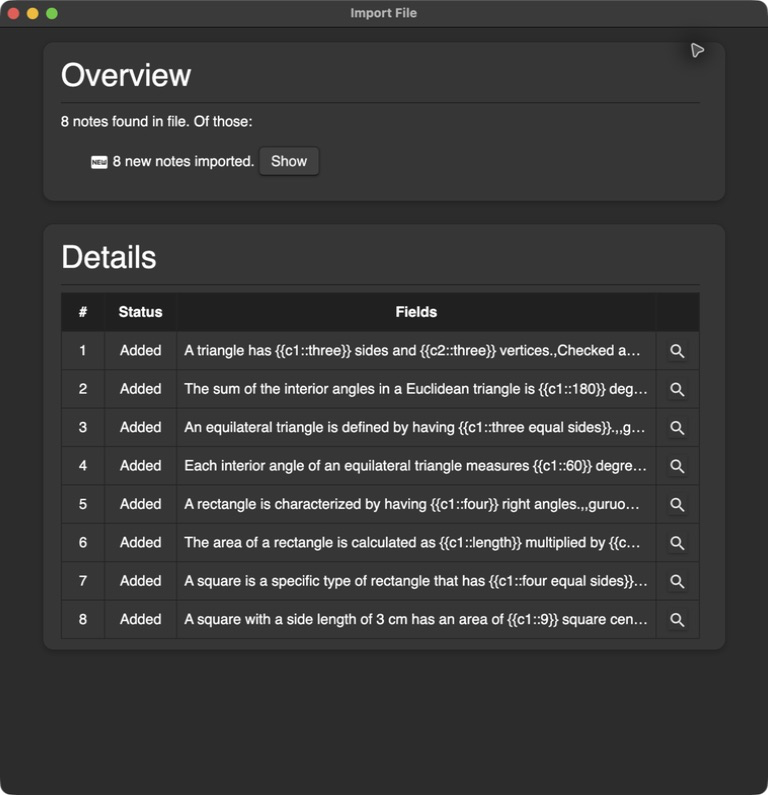
These are developer observations with downloadable evidence, not independent certification or a promise that every shared deck works.
Native Anki sync (advanced)
GuruOwl can act as your Anki sync server — the same protocol AnkiWeb uses. That means desktop Anki or AnkiMobile can sync a full collection directly into your GuruOwl account:
- Open Settings → Native Anki Sync and set a sync password.
- In Anki desktop: Preferences → Syncing → Self-hosted sync server, enter the server address shown on that page, and log in with your GuruOwl email + the sync password.
- Hit Sync in Anki. Your collection lands in GuruOwl; the signed-in devices list on the settings page shows every client that's connected.
Changing the sync password signs out all connected Anki devices (they'll re-authenticate with the new one). You can also disable native sync entirely from the same page.
Which to use?
- Just moving some decks in or out → import/export
.apkg. Simple, one-shot. - A big shared deck (AnKing, Zanki, MileDown, a language deck with audio) → import on iPhone; the web uploader skips media.
- Living in Anki, but want GuruOwl's AI generation and coaching on the same collection → native sync.
- Living on iPhone → the Guru app's own sync is the smoothest path; Anki compatibility stays available underneath.